The Ergonomic Evolution: How to Reclaim Your Health and Focus at the Desk
Designing the Human-Centric Workstation
Modern work environments often feel like a digital coal mine, demanding hours of stillness from a biological machine built for movement. Euan Lawson, general practitioner and author of The Healthy Writer, describes the current state of desk work as a "modern plague." We have traded physical labor for a sedentary existence that buckles our posture and drains our vitality. To fix this, you must stop treating your workstation as a static piece of furniture and start viewing it as a tool for physical preservation.
Most people plunk their bodies into whatever chair is available without a second thought. This passive approach is the root of chronic neck pain, tight hips, and the dreaded anterior shoulder slump. The first step in this guide is to achieve a neutral posture. This means your feet are flat on the floor, your thighs are parallel to the ground, and your sit bones are firmly supported. This alignment isn't just about comfort; it reduces the intravertebral disc pressure that doubles when we lean forward or hook our feet under our chairs. Your workstation should conform to your body, not the other way around.
Tools for Physical and Mental Resilience
To bridge the gap between a standard office and a high-performance environment, you need specific tools that break the "toxic" ergonomics of the standard laptop. Laptops are the primary offenders in the world of Repetitive Strain Injury (RSI). They force your wrists into contorted angles and your neck into a downward crane. To fix this, you require a few essential materials:
- External Keyboard and Mouse: These allow you to separate the input device from the display, freeing your shoulders and wrists from the laptop's cramped footprint.
- Laptop Riser or Books: You need to elevate your screen so your eyes are level with the top edge. Whether you use a sleek aluminum stand or a stack of medical textbooks, the goal is a neutral cranial angle.
- Timer for Rhythms: A tool to facilitate the Pomodoro Technique. This could be a physical kitchen timer, a watch that vibrates, or software like Be Focused Pro.
- Artificial Tears: Specifically for long-haul sessions where blink rates drop by up to 60%, leading to gritty, irritated eyes.
- A Journal: For the psychological component of work, specifically for Gratitude Journaling.
Step-by-Step Instructions for Workspace Optimization
Follow these steps to transition from a sedentary slog to an intentional, healthy work rhythm.
- Elevate the Display: Place your laptop or monitor on a riser. Adjust the height until your eyes are level with the top of the screen. This ensures you are looking slightly downward without tilting your entire head, which prevents tension headaches across the brow and back of the skull.
- Externalize Your Inputs: Plug in your external keyboard and mouse. Position them so your elbows are at a 90-degree angle and your wrists remain neutral—not resting heavily on the desk, but floating or lightly supported.
- Implement the 20-20-20 Rule: To combat the shriveling effect of screen time on your eyes, set a reminder. Every 20 minutes, look at something 20 feet away for 20 seconds. This forces your ocular muscles to change focal lengths and triggers the natural blinking response you lose when staring at a screen.
- Adopt the Pomodoro Rhythm: Work in intense, 25-minute bursts. During these blocks, focus on a single task—be a serial focuser, not a polyamorous multitasker. When the timer buzzes, get up. You must physically leave the chair.
- Engage in Active Recovery: During your five-minute break, don't look at your phone. Walk, stretch your chest, or look out a window. This movement mitigates the harms of a sedentary week and resets your cognitive capacity for the next burst.
- Establish a Digital Sunset: Protect your sleep, which Euan Lawson calls a "superpower." Turn off all screens at least 60 minutes before bed. Charge your phone across the room to prevent the temptation of late-night scrolling.
Troubleshooting Discomfort and Habit Formation
If you still experience pain despite these changes, the issue likely resides in your overall core strength and tension management. RSI Type 2—the nebulous, aching discomfort that doesn't have a clear medical diagnosis—often requires a whole-body approach. Incorporating yoga or core stabilization exercises into your morning can provide the physical scaffolding your body needs to sit comfortably for longer periods.
If you find yourself procrastinating on the "deep work," use external accountability. Making a public commitment or working with a co-author can force you past the low-hanging fruit of petty administrative tasks. Remember, the goal of these tools and techniques is not to work more, but to work with more intensity and less physical cost. If your eyes are flickering at night or your back feels like a coiled spring, you are ignoring your body's signals. Listen to the gritty feeling in your eyes; it is a signal to blink, move, and reset.
The Outcome of Intentional Growth
By implementing these shifts, you achieve more than just a reduction in back pain. You are designing a life where work does not come at the expense of your well-being. The expected outcome is a sharper mind, a more resilient body, and a higher quality of sleep. When you combine ergonomic fixes with psychological tools like Gratitude Journaling, you break the cycle of negativity and physical strain. You will wake up with a fresh set of eyes, ready to navigate your challenges with inherent strength. Growth happens one intentional step at a time, and your workstation is the perfect place to start.
- Euan Lawson
- 15%· people
- Gratitude Journaling
- 15%· products
- Apple Keyboard
- 8%· products
- Be Focused Pro
- 8%· products
- Cal Newport
- 8%· people
- Other topics
- 46%
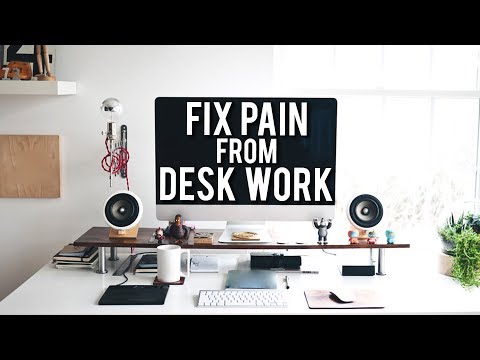
Reduce Workplace Pain And Become More Productive | Dr Euan Lawson
WatchChris Williamson // 1:12:48
